|
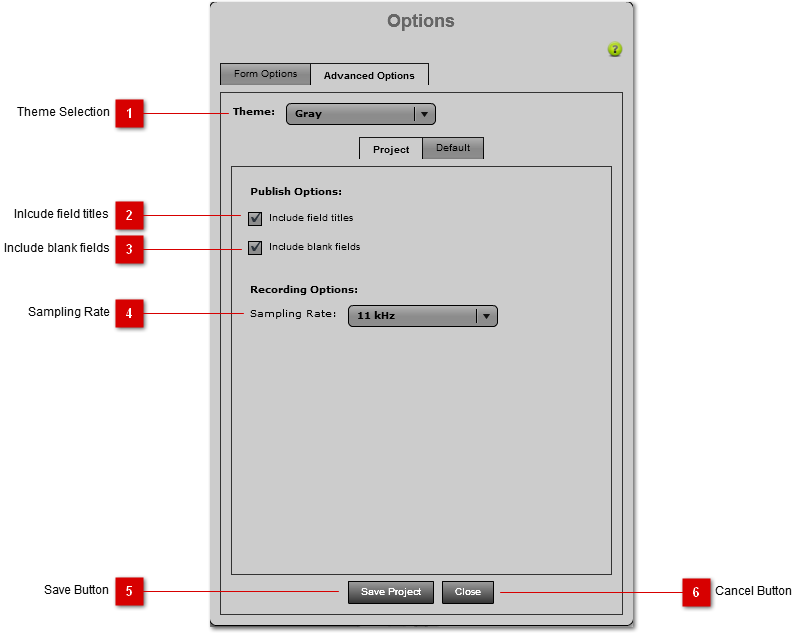
The Advanced Options provide settings for theme, publish options and recording options. These settings can also be saved to the current project or as the application default.
 Theme Selection
Change the interface colour theme by selecting a theme from the pull-down. The theme will be applied as soon as a choice is selected. You cannot save this setting as a project option. This is a global setting only.
| |
 Inlcude field titles
If this is checked, all field labels will be included in the published document as titles before the field value for each object.
| |
 Include blank fields
If this is checked, all fields will be outputed in the published document, including fields that have no value.
| |
 Sampling Rate
The Sampling Rate pull-down allows you to set the sampling rate of the recorded audio. The Higher the sampling the rate, the higher the quality of recording and the larger the audio file. The large audio files will take longer when converting to text because they will take longer to upload to the Speech-to-Text API Server. Becuase the Speech-to-Text API is optimized for 11kHz audio, this setting will provide the best speech-to-text acccuracy.
| |
 Save Button
Pressing this button will save the settings to the current project only.
| |
 Cancel Button
Pressing this button is cancel any unsaved changes and close the window.
| |
|
|