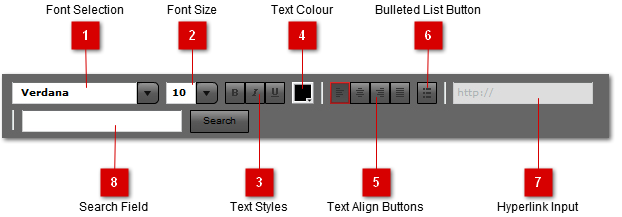
The Rich Text Controls can be used to edit the styling and formatting of the field text.
 Font Selection
Use to change font of the selected text.
|
 Font Size
Change font size of selected text.
|
 Text Styles
Change style of selected text by turning on/off bold, italic or underline formatting.
|
 Text Colour
Change colour of selected text.
|
 Text Align Buttons
Change alignment of selected text.
|
 Bulleted List Button
Create bulleted list with selected text, or insert new list.
|
 Hyperlink Input
Add hyperlink to the selected text. Note: The hyperlink will not be visible and work until the project is published to HTML. To view/edit the hyperlink in the text editor, select the text again.
|
 Search Field
Use this input and search button to search the text in the field. If the search term is found, the search button will become a "Find Next" button until the end of the text is reached. If a search term is entered in the Search Filter in the Structure Panel when and object is opened for editing, this field will be populated with the search term and the first occurance selected. |
|