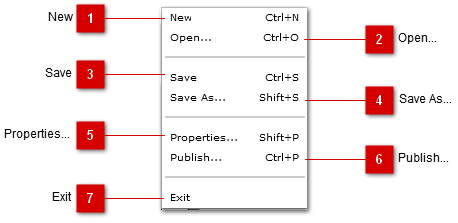
File Menu includes functions to manage the project creation, saving and properties.
 New
Selecting New creates a new project. If the current project has unsaved changes, you will be notified to save changes or discard.
Keyboard Shortcut - Ctrl+N
|
 Open...
Selecting Open... opens a file browser dialog which allows you to choose a .rcp (RapidCapture Project File) to open.
Keyboard Shortcut - Ctrl+O
|
 Save
Selecting Save saves the current project to the last file opened or saved. If no file has been opened or saved, the Save As... dialog opens.
Keyboard Shortcut - Ctrl+S
|
 Save As...
Selecting Save As... opens a file browser dialog and allows you to choose where the project file is saved and the filename for the project file.
Keyboard Shortcut - Shift+S
|
 Properties...
Keyboard Shortcut - Shift+P
|
 Publish...
Selecting Publish... opens the Publish Dialog.
Keyboard Shortcut - Ctrl+P
|
 Exit
Selecting Exit exits the application. If there are unsaved changes made to the project, you will be prompted to save the project or discard changes.
|
|